VOLVO FH16 REI GAMER v1.0 ETS2
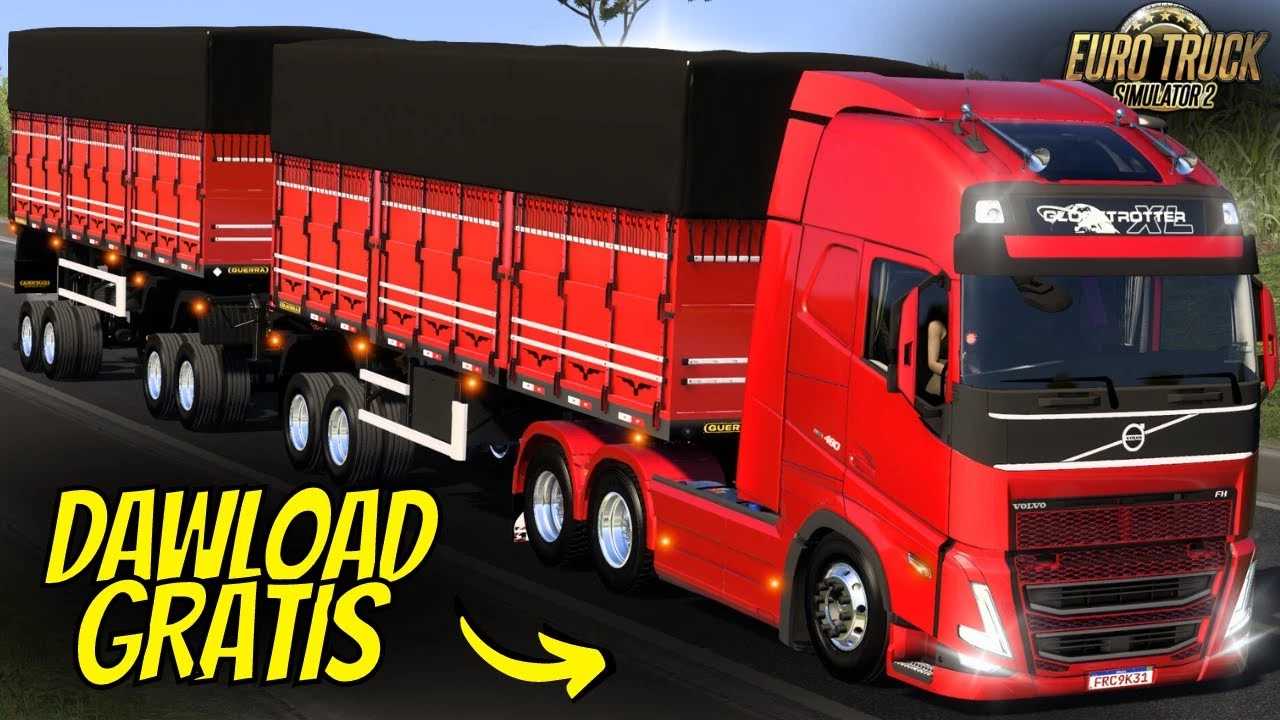

VOLVO FH16 REI GAMER v1.0 ETS2
The name “Volvo FH16 Rei Gamer” refers to a popular and highly customized mod for the game Euro Truck Simulator 2 (ETS2), rather than an official, real-world truck model. “Rei Gamer” is Portuguese for “King Gamer,” and it’s a name given to the mod because of its high level of detail and extensive customization options.
This particular mod is a favorite among players, especially in the Brazilian ETS2 community, because it elevates the standard Volvo FH16 truck in the game to a new level.
Key Features of the Mod
Customization: The “Rei Gamer” mod is all about customization. It adds a huge variety of parts and accessories that aren’t available on the stock in-game truck. This includes custom bumpers, side skirts, exhaust stacks, light bars, mudflaps, and even unique interiors.
Aesthetics: The mod often features a very specific visual style, which is characteristic of highly personalized trucks in Brazil. This can include flashy chrome parts, intricate paint jobs, and a lower-than-usual ride height.
Sound: A key part of the experience is the custom engine and exhaust sounds that often come with the mod. These sounds are designed to be more realistic and powerful than the default game audio, making the truck feel more immersive.
Performance: The mod usually includes various engine options, with the most powerful being the 750 horsepower engine. This is a real-world engine for the Volvo FH16, but the mod might tweak its performance to feel even more responsive and powerful in the game.
In short, “Volvo FH16 Rei Gamer” isn’t something you can buy in a dealership, but it’s a well-known and beloved digital creation that allows ETS2 players to drive a highly-tuned and visually striking version of the Volvo FH16.
Credits: rei do gamer
How to install ETS2 mods or ATS Mods
In Euro Truck Simulator 2 it’s easy to install mods. You just need to download mod from here, copy/unzip files into: “My Documents\Euro Truck Simulator 2\mod” folder or if you play ATS please install mods to: “My Documents\American Truck Simulator\mod” folder. To unzip files you can use: WinRAR or 7zip. After that you need to activate the mods you want to use.