Urban Traffic Overhaul v22.1 ATS

Urban Traffic Overhaul v22.1 ATS
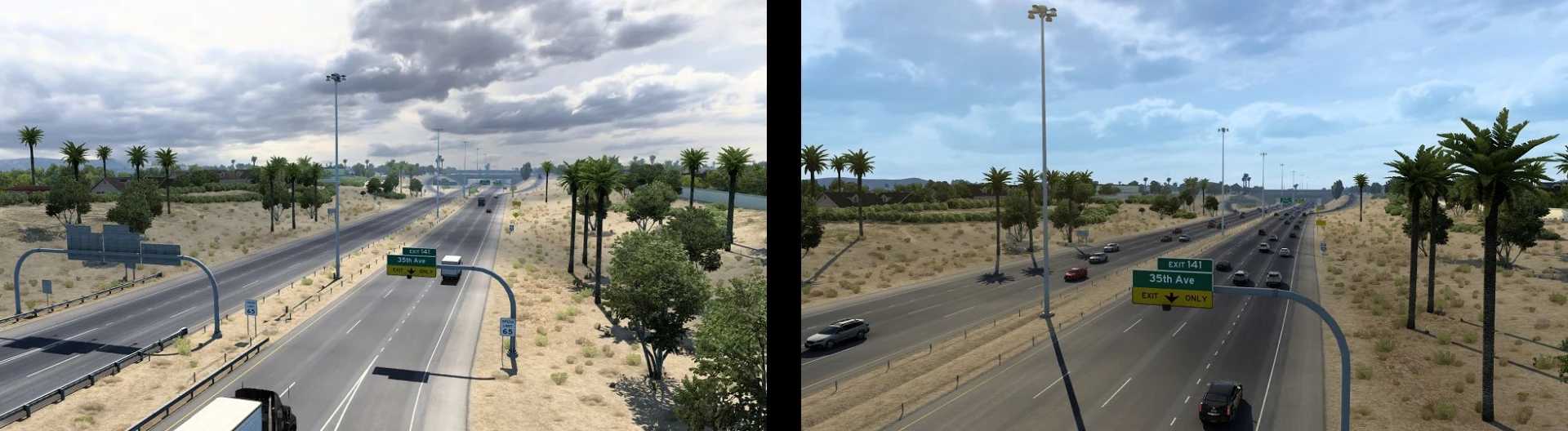
While this mod is closer to a traffic mod than a map mod, busy areas with increased traffic spawns have to be defined manually in the map editor, requiring map edits, simply modifying definition files to increase traffic spawn rates and limits like a lot of “realistic traffic” mods do would make the whole map busy with traffic, from major cities to unpopulated rural areas, that’s why editing the map itself is necessary for decently realistic traffic density.
This mod also widens freeways and urbanizes some areas of Phoenix, just a small touch-up I’ve done years ago as that area has always bothered me in terms of accuracy. Use the available “Lite” version if you want only the scenery changes in the Phoenix Area and no edits to traffic density in cities.
Mod updated (22.1)
Port areas properly implemented (high spawn rates for semi-trucks at major ports, currently being the ports of Los Angeles/Long Beach, Oakland, Seattle, Houston and New Orleans). Deleting traffic_data.sii and traffic_rules_spawn.sui shouldn’t crash the game anymore.
Temporary workaround for high density traffic spawning.
Dense traffic spawn areas of Dallas/Fort Worth, Salina-KS, Junction City-KS, tweaked.
Credits: Quaristice
How to install ETS2 mods or ATS Mods
In Euro Truck Simulator 2 it’s easy to install mods. You just need to download mod from here, copy/unzip files into: “My Documents\Euro Truck Simulator 2\mod” folder or if you play ATS please install mods to: “My Documents\American Truck Simulator\mod” folder. To unzip files you can use: WinRAR or 7zip. After that you need to activate the mods you want to use.