Next Generation Scania PGRS Pack v1.60 ETS2
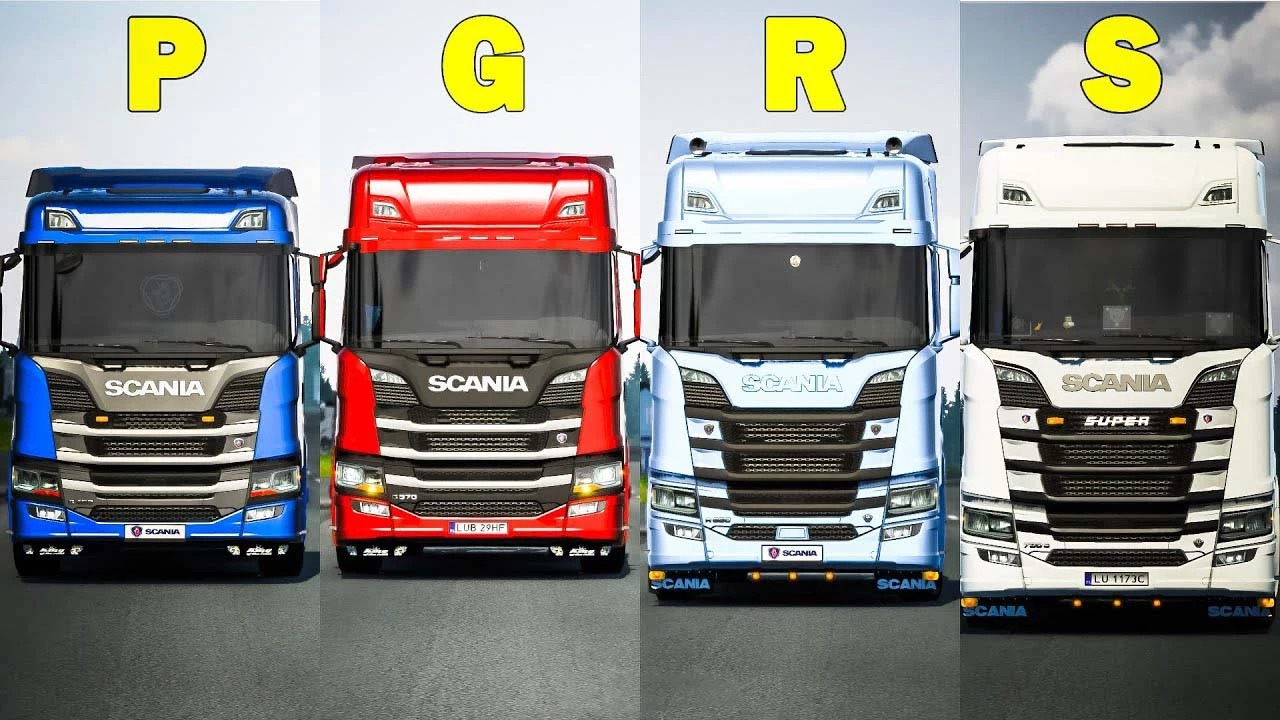

Next Generation Scania PGRS Pack v1.60 ETS2
Changelog :
New 40 mm front bumpers support : high, medium, low variants (plastic black & painted)
Support for new bumper fog lights (covered, standard & modern)
Support for new top cabin aux lights (G-Series & P-Series)
Support for the updated front fenders (blind spot sensors)
Extended lowbars support
Extended sidebars & sidepipes support for most sideskirts (4×2, 6×2 short, 6×2 long & 6×4 extra long)
Extended support for the HS Schoch parts
Fixed missing engine badges
Fixed academy, truck dealer & quick jobs configurations
Updated interior mirrors position
Updated definitions for wipers & windows (R-Series & S-Series)
Fixed collision with R-Series & S-Series cabins
Known issues :
Exterior animation of the side windows are currently broken (known SCS issue)
Front licence plate bracket clip with the new 40 mm front bumpers, please just use the licence plate
Some of the front bumpers & front fenders are outdated, these are labelled as “!DO NOT USE!” in the shop, please don’t use them because they won’t work properly
Description
This is a pack of Next Generation of Scania trucks. Mod based on default Scania R & S Series by SCS Software.
P & G Series and other stuff added, such as new chassis, sideskirts, roof spoilers.
Truck replaces default Scania R & S series, also trucks in quick jobs are modded, both EU and UK
Showroom models are new aswell
Game version: 1.60
Credits: Eugene, MPROx98
How to install ETS2 mods or ATS Mods
In Euro Truck Simulator 2 it’s easy to install mods. You just need to download mod from here, copy/unzip files into: “My Documents\Euro Truck Simulator 2\mod” folder or if you play ATS please install mods to: “My Documents\American Truck Simulator\mod” folder. To unzip files you can use: WinRAR or 7zip. After that you need to activate the mods you want to use.