VW Meteor 460 v1.0 ETS2
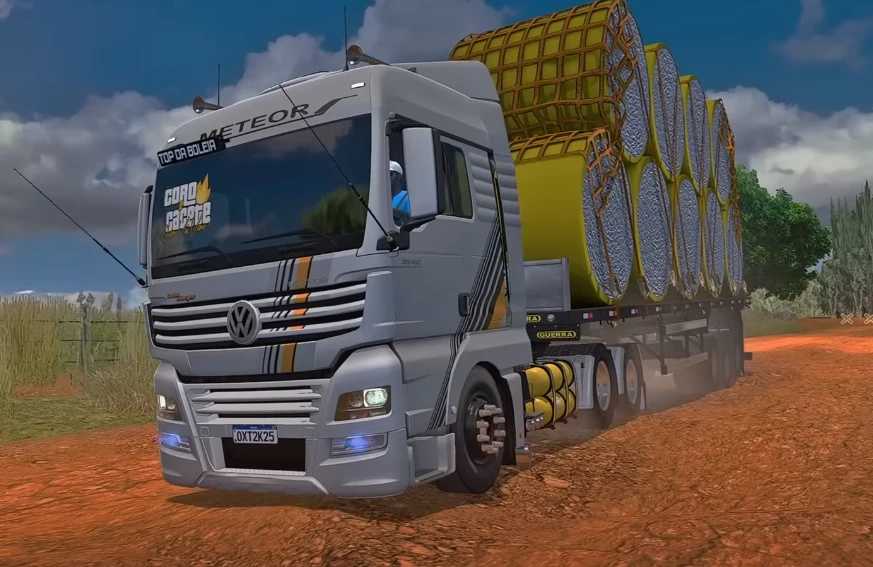

VW Meteor 460 v1.0 ETS2
Tires and Wheels: Road-legal tires and wheels that appear to be aluminum.
Bumper: With integrated auxiliary and parking lights.
Mirrors: Large, dual-stage (main and convex).
Air Deflectors: Located on the top and sides of the cab.
Antennas: “PX” antennas on the sides of the cab.
Lighting: LED main and fog lights.
Fuel Tanks: Multiple tanks on the sides.
Toolbox: Small compartments on the sides of the chassis.
Cab Access Ladder: Steps for easy entry and exit.
Mud Flaps: Behind the wheels.
Cabin Interior Accessories:
Steering Wheel: With integrated controls.
Dashboard: Digital and analog.
Multimedia Center: Screen for navigation and other functions.
Seats: Upholstered in what appears to be orange and black leather.
Identification: The truck has the “GBN 13AM” logo on the inside of the windshield.
Storage compartments: Above the windshield.
Credits: MATUTO
How to install ETS2 mods or ATS Mods
In Euro Truck Simulator 2 it’s easy to install mods. You just need to download mod from here, copy/unzip files into: “My Documents\Euro Truck Simulator 2\mod” folder or if you play ATS please install mods to: “My Documents\American Truck Simulator\mod” folder. To unzip files you can use: WinRAR or 7zip. After that you need to activate the mods you want to use.