VOLVO VM BQ ETS2 v1.0 ETS2

VOLVO VM BQ ETS2 v1.0 ETS2
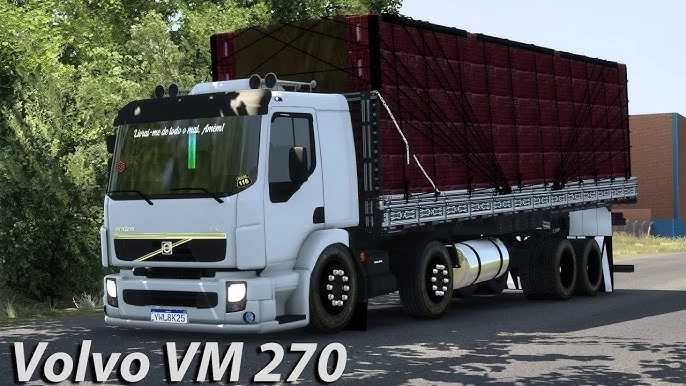
The term “VOLVO VM BQ ETS2” refers to a popular mod for Euro Truck Simulator 2 that features a highly customized Volvo VM truck. In this context, “BQ” likely stands for “Boia Qualificada,” a Brazilian slang term that translates to “qualified float” or “qualified accessory,” meaning the mod comes with a bunch of high-quality, Brazilian-style customizations.
What Makes This Mod a Must-Have for Fans?
Brazilian Truck Culture: This mod is a prime example of the rich modding scene in Brazil. It perfectly captures the look and feel of the trucks seen on Brazilian roads, which are often highly personalized.
Unique Customizations: The “BQ” part is what sets this mod apart. It usually includes a huge range of accessories that aren’t available in the base game, such as:
Custom Chassis: Different axle configurations (like 6×2 or 8×2) and a variety of ride heights, including lowered options.
Boia: Custom accessories and decor, like horns, lights, and mudflaps.
Trailers: The mod often works with specialized trailers, like “boiadeiro” (cattle transport) or various types of flatbeds and cargo boxes.
Realistic Sound: Like many top-tier mods from Brazilian creators, the Volvo VM BQ will have a custom sound pack that faithfully reproduces the sound of the real truck’s engine, creating a deeply immersive driving experience.
High-Quality Model: The truck model itself is usually very detailed, both on the exterior and in the interior, with accurate dashboards, animations, and textures.
Credits: JUNIOR
How to install ETS2 mods or ATS Mods
In Euro Truck Simulator 2 it’s easy to install mods. You just need to download mod from here, copy/unzip files into: “My Documents\Euro Truck Simulator 2\mod” folder or if you play ATS please install mods to: “My Documents\American Truck Simulator\mod” folder. To unzip files you can use: WinRAR or 7zip. After that you need to activate the mods you want to use.