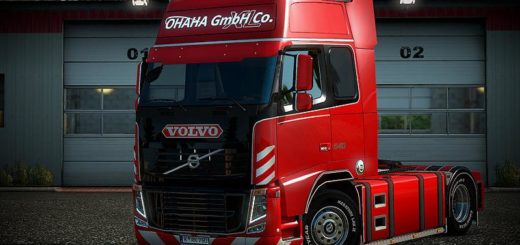
Volvo Magro 2009 v1.0 ETS2


Volvo Magro 2009 v1.0 ETS2
The 2009 Volvo FH16, often referred to as the “Skinny Volvo” or “Classic Volvo” by Euro Truck Simulator 2 (ETS2) fans, is a very popular truck among players seeking a more traditional and realistic experience. It stands out for its iconic design and, when modified, can offer a variety of customization options.
What to expect from a 2009 Volvo FH16 mod in ETS2?
2009 Volvo FH16 mods generally aim to recreate the truck with as much detail as possible, including:
High-quality 3D modeling: Faithful reproduction of the cab, chassis, and exterior details.
Various customization options:
Cabs: Various cab options (Globetrotter, Globetrotter XL, etc.).
Chassis: Different axle configurations (4×2, 6×2, 6×4, 8×4), with or without air suspension.
Engines: Realistic engine options with the original power outputs of the 2009 FH16.
Transmissions: Gearboxes that simulate real-world performance.
Accessories: A wide range of accessories such as bumpers, headlights, taillights, grilles, tanks, exhausts, metallic paint, stickers, curtains, and even integrated GPS.
Realistic Sounds: Many mods come with engine and horn sounds recorded from real Volvo trucks, increasing immersion.
Improved Physics: Some mods include adjustments to the truck’s physics for more realistic handling, both on paved and dirt roads.
How to Install:
1. Download the Mod File: Most mods come in `.scs` format. Sometimes they come in a .zip or .rar file that needs to be extracted to reveal the .scs file(s).
2. Move the file to the “mod” folder: Go to your game’s documents folder. It’s usually located in `Documents/Euro Truck Simulator 2/mod`. Drag and drop the .scs file(s) into this folder.
3. Activate the mod in the game:
Open Euro Truck Simulator 2.
On the home screen, click “Mod Manager”.
Find the Volvo FH16 2009 mod in the list.
Double-click the mod icon to activate it (it will appear in the right column).
Click “Confirm Changes.”
You can now go to an in-game Volvo dealership to purchase the truck or modify it if you already have one.
Important: Always check the mod’s compatibility with your current version of ETS2. Older mods may not work on newer versions of the game, and vice versa, potentially causing crashes or bugs. Many mod creators update their work for the latest versions of the game.
If you have a specific version of the game in mind or a mod you’d like to see, let me know!
Credits: w beraldo
How to install ETS2 mods or ATS Mods
In Euro Truck Simulator 2 it’s easy to install mods. You just need to download mod from here, copy/unzip files into: “My Documents\Euro Truck Simulator 2\mod” folder or if you play ATS please install mods to: “My Documents\American Truck Simulator\mod” folder. To unzip files you can use: WinRAR or 7zip. After that you need to activate the mods you want to use.