Volkswagen Meteor v1.0 ETS2

Volkswagen Meteor v1.0 ETS2
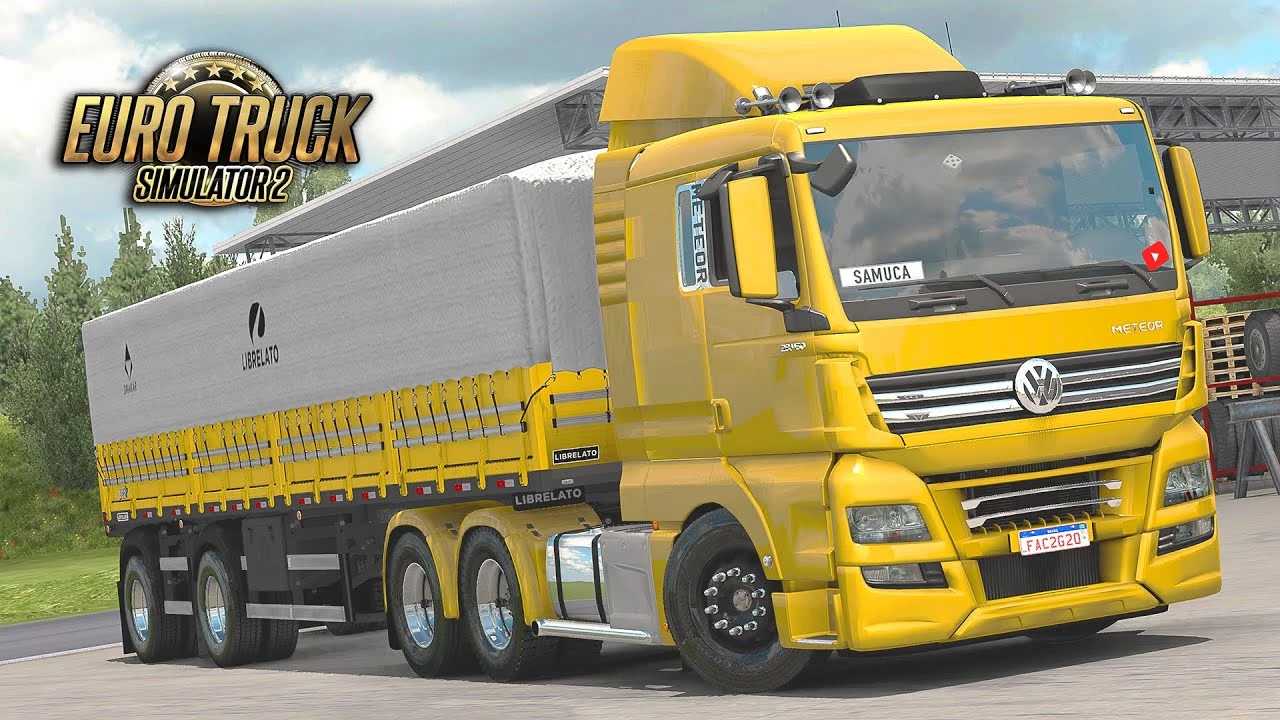
The Volkswagen Meteor is a much sought-after truck for Euro Truck Simulator 2 (ETS2) players, especially as it is a very popular model in Brazil. There are several high-quality mods available for the VW Meteor in ETS2, created by dedicated modders.
Common Features of Volkswagen Meteor Mods:
Detailed Models: The mods generally feature well-done 3D models of both the exterior and interior of the cabin, with realistic textures.
Chassis Options: It’s common to find 6×2 and 6×4 chassis options, reflecting the real truck’s configurations.
Engines and Transmissions: Mods usually include the 460 hp D2676 (for 6×2 chassis) and 520 hp (for 6×4 chassis) engines, as well as 12-speed and 16-speed ZF Traxon transmissions.
Customization: Many mods offer a wide range of accessories, such as different deflectors, interior options (including bunk beds), lights, and the possibility of adding custom skins.
Realistic sounds: Modders often recreate the engine and transmission sounds for a more immersive experience.
Digital Dashboard: Some more recent mods include a functional digital dashboard with fixes for speed control icons, gear information and LED indicators.
Compatibility: Modders such as Cristhian Cardoso, a well-known name in the ETS2 modding community, have updated their Meteor mods to be compatible with the latest versions of the game, including 1.51x – 1.55x.
Installation (for .scs files):
1. Download the mod file (usually a .zip or .rar archive containing one or more .scs files).
2. Extract the .scs files.
3. Copy these .scs files to the `Documents\Euro Truck Simulator 2\mod` folder.
4. Start ETS2.
5. On the profile selection screen, click on “Mod Manager”.
6. Find the Volkswagen Meteor mod in the left column and activate it by clicking on the right arrow to move it to the active mods column.
7. Click on “Confirm Changes”.
8. Load your game profile. The truck should be available for purchase at an in-game mod dealer.
Important Tips:
Check the Version: Always make sure that the mod is compatible with the version of your Euro Truck Simulator 2 to avoid problems.
Order of Mods: In the Mod Manager, the loading order can be important. If the mod creator specifies an order, follow it.
Conflicts: If you have a lot of mods, conflicts can occur. If you encounter problems, try testing the Meteor mod on its own or with a minimum number of other mods.
With a Volkswagen Meteor mod, you can enjoy a more authentic and diverse driving experience in ETS2!
Credits: cristian
How to install ETS2 mods or ATS Mods
In Euro Truck Simulator 2 it’s easy to install mods. You just need to download mod from here, copy/unzip files into: “My Documents\Euro Truck Simulator 2\mod” folder or if you play ATS please install mods to: “My Documents\American Truck Simulator\mod” folder. To unzip files you can use: WinRAR or 7zip. After that you need to activate the mods you want to use.