Scania LED Sign v1.0 ETS2

Scania LED Sign v1.0 ETS2
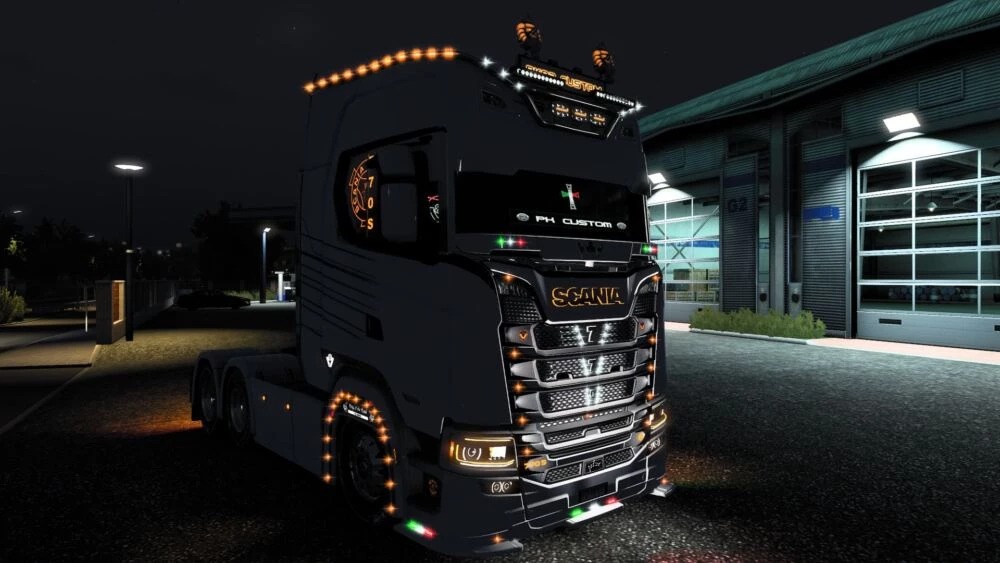
This customization kit for the Next Gen Scania S focuses on the striking contrast between a matte dark paint job and an intricate, heavy-duty lighting system.
Exterior Lighting: The rig features a massive array of orange LED markers (lollipop lights) outlining the roofline and the front wheel arches, providing a distinct “glow-in-the-dark” silhouette.
Grille & Front End: The front grille is decked out with chrome accents and cool-white V-shaped LED inserts, highlighting the V8 powerhouse within. Subtle Italian flag motifs (Green, White, Red) are placed on the front lip and sunshield.
Cabin Customization: Featuring “PH Custom” branding on the sun visor and a glowing Scania logo on the side window, this truck screams premium driver ownership.
Accessories: Includes a high-mounted light bar with extra spotlights and traditional air horns for that classic “King of the Road” presence
Credits: pk92, freccia
How to install ETS2 mods or ATS Mods
In Euro Truck Simulator 2 it’s easy to install mods. You just need to download mod from here, copy/unzip files into: “My Documents\Euro Truck Simulator 2\mod” folder or if you play ATS please install mods to: “My Documents\American Truck Simulator\mod” folder. To unzip files you can use: WinRAR or 7zip. After that you need to activate the mods you want to use.