Scania 111S 1987 1.55 ETS2
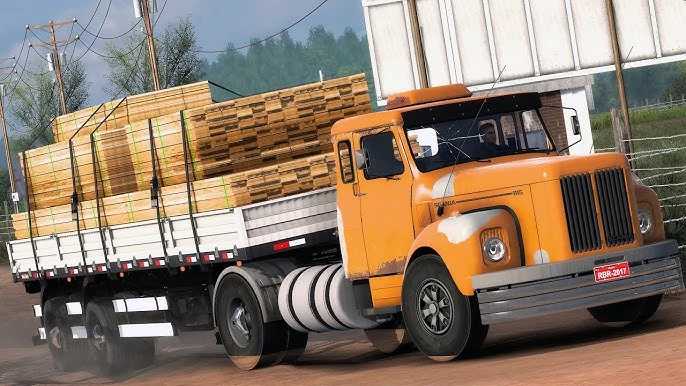

Scania 111S 1987 1.55 ETS2
Like the other vehicles you asked about, the 1987 Scania 111S is not officially featured in the game Euro Truck Simulator 2 (ETS 2). SCS Software, the game’s developer, has licences for Scania’s more modern trucks, such as the S and R series. Classic models, such as the legendary ‘Jacaré’, can only be added to the game through mods (modifications).
How to get the Scania 111S in ETS 2
The only way to drive this classic, known in Brazil as Scania ‘Jacaré’, is by installing a mod. The ETS 2 modding community is very active and creates high-quality versions of these old trucks.
Search for Mods: Search on Steam Workshop or trusted mod sites, such as World of Mods, using terms such as ‘Scania 111S mod ETS2’ or ‘Scania 111S Jacaré ETS2’.
Mod Quality: The best 111S mods usually offer:
Detailed 3D modelling: replicating the iconic exterior and nostalgic interior.
Realistic engine sounds: the roar of the 111S engine is a striking feature.
Customisation: paint options, wheels and accessories that hark back to the era.
Driving physics: to simulate the feel of driving an older truck.
Installation: After downloading the mod file (usually .scs), simply place it in the ETS 2 ‘mod’ folder (located in `Documents/Euro Truck Simulator 2/mod`) and activate it in the ‘Mod Manager’ in the game’s main menu.
If you’re a fan of classic trucks, the Scania 111S is one of the most popular and well-made mods for ETS 2. It’s a great way to relive nostalgia and add a bit of road transport history to your game.
Credits: pancado
How to install ETS2 mods or ATS Mods
In Euro Truck Simulator 2 it’s easy to install mods. You just need to download mod from here, copy/unzip files into: “My Documents\Euro Truck Simulator 2\mod” folder or if you play ATS please install mods to: “My Documents\American Truck Simulator\mod” folder. To unzip files you can use: WinRAR or 7zip. After that you need to activate the mods you want to use.