Realistic Interaction Symbols v1.0 ETS2

Realistic Interaction Symbols v1.0 ETS2
This mod aims to increase immersion and improve quality of life for players.
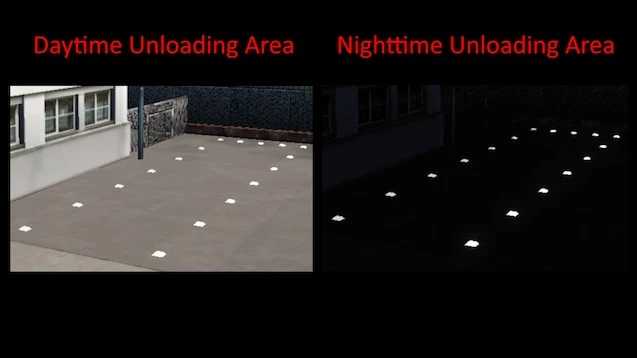
The green animated symbols that float around the map have been replaced with more realistic objects, namely inspection boxes surrounded by non-slip plates.
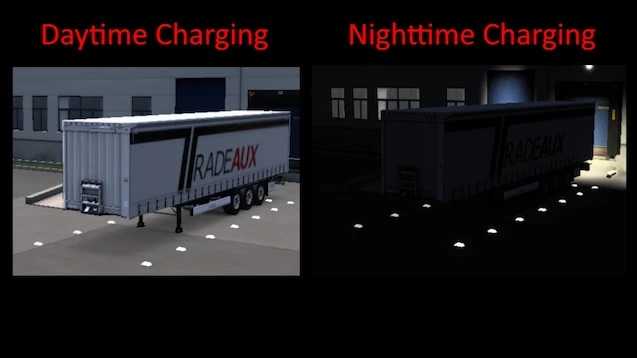
For loading, white reflectors have been implemented around the trailer to help identify it. At night, they will be illuminated, making it easier to locate the trailer.
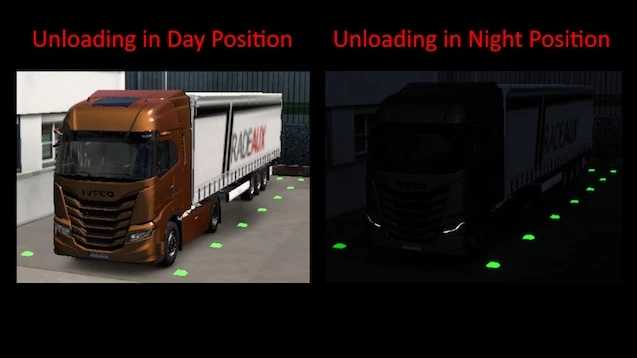
For unloading, the white reflectors will be there to show the position where the trailer should be placed. The photos above show that the rear of the trailer should be positioned in the direction of the reflectors. When in the correct position, the reflectors will change color to green. They will also be illuminated, making it easier to locate the trailer.
The mod was created to work with the original Europe map and official DLCs.
Due to the difference in height of the original animated green symbols in the game, it is expected that some inspection boxes may be higher on the ground or invisible, making it necessary to use GPS for guidance.
I have identified a type of inspection station in Durrës that will remain with the green symbols from the game because I cannot locate the file to make the change to the inspection box.
On modded maps, there may be visual limitations due to uneven terrain and changes in object heights.
Credits: Carlitos
How to install ETS2 mods or ATS Mods
In Euro Truck Simulator 2 it’s easy to install mods. You just need to download mod from here, copy/unzip files into: “My Documents\Euro Truck Simulator 2\mod” folder or if you play ATS please install mods to: “My Documents\American Truck Simulator\mod” folder. To unzip files you can use: WinRAR or 7zip. After that you need to activate the mods you want to use.