MB 1620 2 1.55 ETS2

MB 1620 2 1.55 ETS2
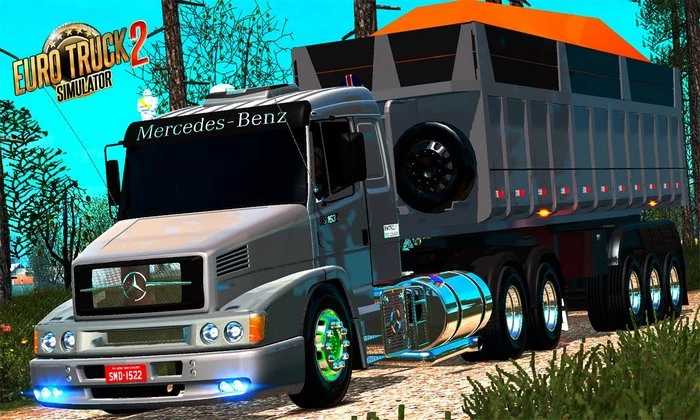
Unfortunately, the Mercedes-Benz MB 1620 is not officially featured in the game Euro Truck Simulator 2 (ETS 2). SCS Software, the game’s developer, has licensing agreements with a limited number of truck manufacturers, and Mercedes-Benz is not one of those partners for older models.
How to get the MB 1620 in ETS 2?
The only way to drive an MB 1620 in the game is through mods (modifications) created by the player community. There are many high-quality mods available on modding websites and on Steam Workshop.
Important points about mods:
Look for reliable mods: Always look for mods on well-known websites with good reviews. This helps to avoid compatibility issues and possible bugs in the game.
Installation: Most truck mods have a simple installation process: you download the file, place it in the ETS 2 ‘mod’ folder, and activate it in the Mod Manager within the game.
Variable quality: The quality of mods can vary greatly. Some are extremely detailed, with realistic engine sounds and accurately modelled interiors, while others may be simpler.
If you are a fan of the MB 1620, it is worth searching Steam Workshop or websites such as World of Mods to find a version that suits you. It is the best way to relive the experience of driving this classic Brazilian transport vehicle in the virtual world of ETS 2.
Credits: nacho fernandez
How to install ETS2 mods or ATS Mods
In Euro Truck Simulator 2 it’s easy to install mods. You just need to download mod from here, copy/unzip files into: “My Documents\Euro Truck Simulator 2\mod” folder or if you play ATS please install mods to: “My Documents\American Truck Simulator\mod” folder. To unzip files you can use: WinRAR or 7zip. After that you need to activate the mods you want to use.