Marcopolo New G7 1200 Multichassis v3.0 1.49.x ETS2



Marcopolo New G7 1200 Multichassis v3.0 1.49.x ETS2
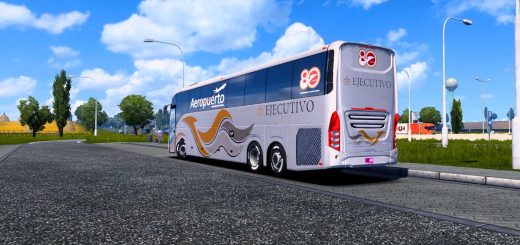
Marcopolo New G7 1200 – This powerful bus has been specifically designed for virtual driving enthusiasts who want an authentic and realistic experience. The exterior of the New G7 1200 is a sight to behold, with its aerodynamic shape and attention to detail. The front grille is bold and eye-catching, giving the bus a fierce and modern look. The headlights are LED, providing better visibility during night drives. The large windshield provides an unobstructed view of the road ahead, giving the driver a sense of control and confidence.
The Multichassis feature allows for easy customization, making it suitable for a variety of tasks and routes. With its impressive design and performance, the Marcopolo New G7 1200 Multichassis is definitely a must-have for any ETS2 player looking to elevate their virtual driving experience.
Features Marcopolo New G7 1200:
– Independent bus model
– High quality 3D model
– High quality detailed exterior
– High quality detailed interior
– the model has own interior
– the model has own sound
– the model has own wheels
– the model has passangers seats
– present the illumination of arrow speedometer and tachometer
– the character is correctly sitting in the driver’s seat
– the choice of engine power
– the choice of transmission and gearbox
– the choice of wheels and rims
– choice of color body / metallic paint / skins
– correct position of the Marcopolo logo
– Working headlights, brake lights, tail lights, front and rear turn signals, steering wheel and reverse signals
– The correct position of the player
– Support for passengers in the bus
– Baggage insertion
– Interior and Exterior Animations
– Working lights
– Working mirrors
– There are external tuning
– Supports all major functions of the game
– Buy from Acces Mod dealer
Tested on game version 1.49.x
Credits: Norman Rodrigues, Julio Cesar, TitiGameplay, Bernardo Andrade, Lucas Souza, Enzo Caldeirini, Cristhian Cardoso, Thomas Povaluk, Henrique Araujo
How to install ETS2 mods or ATS Mods
In Euro Truck Simulator 2 it’s easy to install mods. You just need to download mod from here, copy/unzip files into: “My Documents\Euro Truck Simulator 2\mod” folder or if you play ATS please install mods to: “My Documents\American Truck Simulator\mod” folder. To unzip files you can use: WinRAR or 7zip. After that you need to activate the mods you want to use.