DAF XG+ Tuning Combo v1.8 ETS2
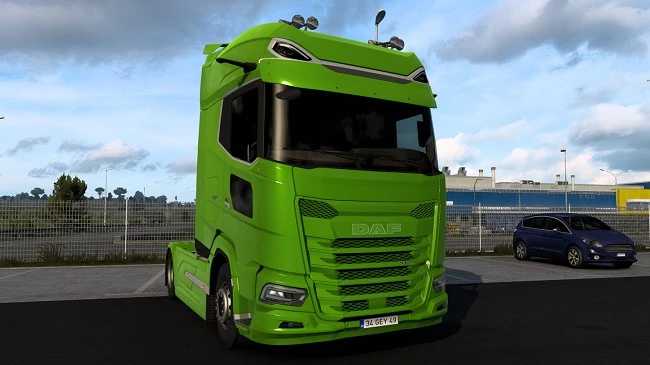

DAF XG+ Tuning Combo v1.8 ETS2
– Red and white interior;
– White and red steering wheel;
– Red and white seats;
– Red and white seats with a closed passenger;
– Red and white door in the interior;
– Door with red and white glass;
– Premium extended sun visor with LED;
– Front extended mirror (plastic);
– Front grille made of plastic, painted;
– Painted front grille;
– Full painting of the front grille;
– Low front grille made of plastic, painted;
– Painted low front grille;
– Full painting of the low front grille;
– Painting the rear wing;
– Painting the upper part of the rear wing;
– Painting of the rear wing 6×2;
– The upper part of the rear wing is 6×2 Painted;
– Logo with LED;
– Original logo with LED;
– Roof deflector;
– Side skirt FTS / FTN.
Credits: Nikdalka
How to install ETS2 mods or ATS Mods
In Euro Truck Simulator 2 it’s easy to install mods. You just need to download mod from here, copy/unzip files into: “My Documents\Euro Truck Simulator 2\mod” folder or if you play ATS please install mods to: “My Documents\American Truck Simulator\mod” folder. To unzip files you can use: WinRAR or 7zip. After that you need to activate the mods you want to use.