Next Generation Scania PGRS Pack v2.9 1.62 ETS2

Next Generation Scania PGRS Pack v2.9 1.62 ETS2
Changelog :
New 40 mm front bumpers support : high, medium, low variants (plastic black & painted)
Support for new bumper fog lights (covered, standard & modern)
Support for new top cabin aux lights (G-Series & P-Series)
Support for the updated front fenders (blind spot sensors)
Extended lowbars support
Extended sidebars & sidepipes support for most sideskirts (4×2, 6×2 short, 6×2 long & 6×4 extra long)
Extended support for the HS Schoch parts
Fixed missing engine badges
Fixed academy, truck dealer & quick jobs configurations
Updated interior mirrors position
Updated definitions for wipers & windows (R-Series & S-Series)
Fixed collision with R-Series & S-Series cabins
Updated interior definitions
Updated wheels position (truck may sit a little lower)
Updated for Coaches DLC, door SUPER badge support added for P-Series & G-Series
Known issues :
Front licence plate bracket might clip with the new 40 mm front bumpers – please just use the licence plate
Description
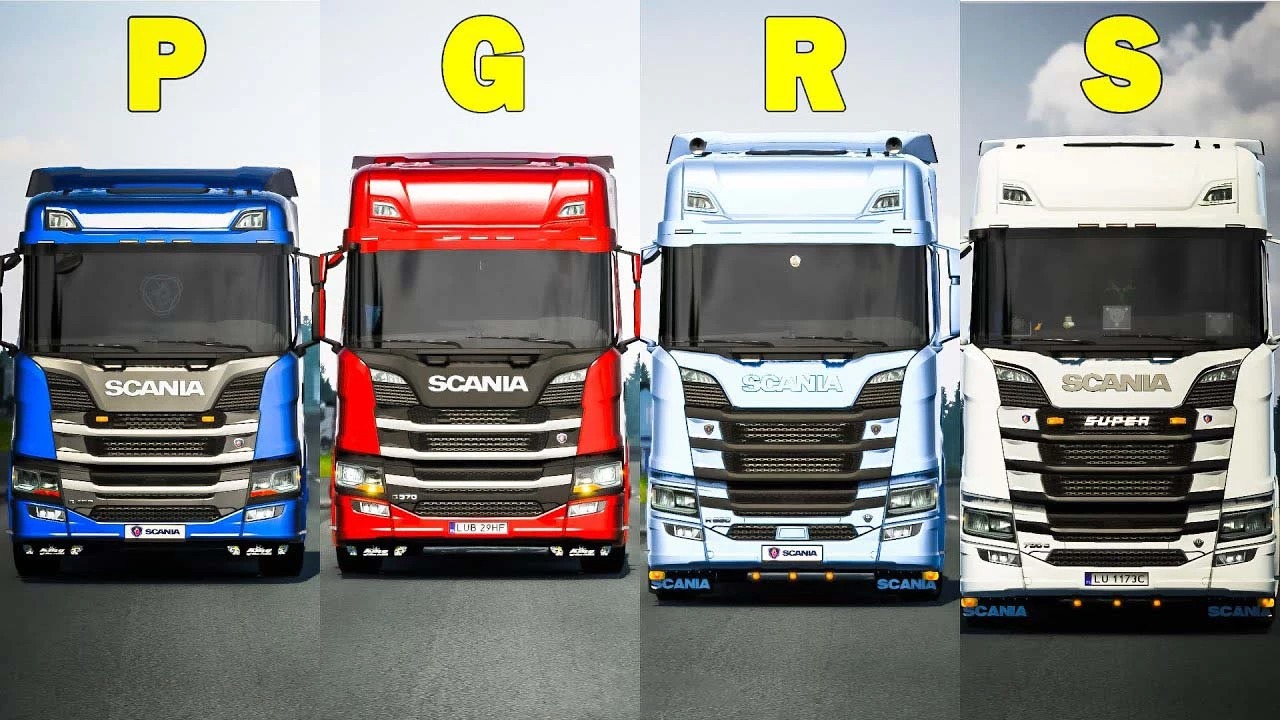
This is a pack of Next Generation of Scania trucks. Mod based on default Scania R & S Series by SCS Software.
P & G Series and other stuff added, such as new chassis, sideskirts, roof spoilers.
Truck replaces default Scania R & S series, also trucks in quick jobs are modded, both EU and UK
Showroom models are new aswell
Game version: 1.62
Credits: Eugene, MPROx98
How to install ETS2 mods or ATS Mods
In Euro Truck Simulator 2 it’s easy to install mods. You just need to download mod from here, copy/unzip files into: “My Documents\Euro Truck Simulator 2\mod” folder or if you play ATS please install mods to: “My Documents\American Truck Simulator\mod” folder. To unzip files you can use: WinRAR or 7zip. After that you need to activate the mods you want to use.