EXPRESS ENGINE PACK – CUMMINS N14, CAT C15 6NZ, MACK E9 V8, DETROIT 8V92 V1.2 ATS


EXPRESS ENGINE PACK – CUMMINS N14, CAT C15 6NZ, MACK E9 V8, DETROIT 8V92 V1.2 ATS
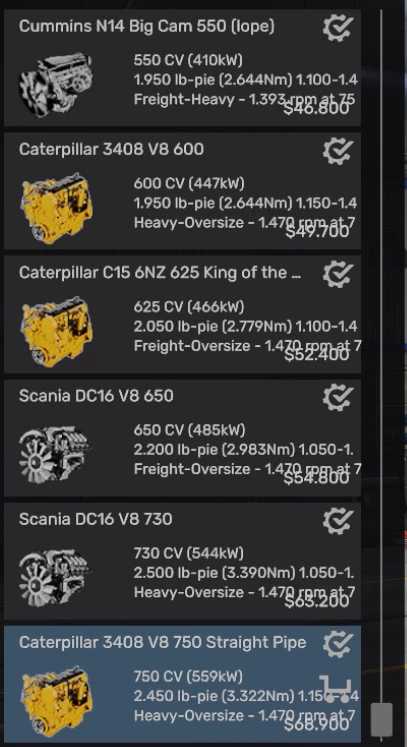
14 real American engines and 4 gearboxes built for a job instead of a spec sheet — Cummins N14, CAT 1693, CAT C15 6NZ, CAT 3408 V8, Mack E9 V8, PACCAR MX-13, Detroit Diesel 8V92 two-stroke and the Scania DC16 V8. Fits all 18 stock trucks. Every figure came out of the game’s own files or the manufacturer’s data sheet. The build refuses to pack an engine whose torque curve does not match its own badge. Four gearboxes, one per kind of work: Light, Freight, Heavy Haul and Oversize. Geared for 120 km/h instead of the stock 65 mph, and the pack opens the speed limiter so you can use it. The dealer card finally tells you what the game never has: what cargo the engine is for, and what rpm it will turn at 75 mph. Sounds included — nothing depends on a second mod.
INSTALLATION
1. Unpack the archive. You get two files:
Express_Engines_ATS.scs the pack
Express_Engines_ATS_Stats.scs optional, see below
2. Copy them to:
Documents/American Truck Simulator/mod
3. Enable them in the Mod Manager and drag the pack ABOVE any other engine or sound mod, or theirs will win.
4. New engines and gearboxes appear at the truck dealer and in the truck configurator at any service station.
Express_Engines_ATS_Stats.scs is optional. ATS scores every truck in five vocations and its stock scale stops at the biggest engine the game ships, so with this pack installed the bars would peg and stop telling you anything. This widens them. It also rescales stock engines — that is why you can leave it out.
HEADS UP — MIRROR FOV MODS.
The pack carries its own def/game_data.sii to open the speed limiter, and that file also holds the mirror field-of-view values. If you run a mirror FOV mod, delete def/game_data.sii from inside Express_Engines_ATS.scs and turn the truck speed limiter off in Options > Gameplay instead. Same result, no conflict.
Requires ATS 1.59, 1.60 or 1.61. Works on every stock truck except the electric Volvo VNR-E.
Credits: Express Mods & Tips
How to install ETS2 mods or ATS Mods
In Euro Truck Simulator 2 it’s easy to install mods. You just need to download mod from here, copy/unzip files into: “My Documents\Euro Truck Simulator 2\mod” folder or if you play ATS please install mods to: “My Documents\American Truck Simulator\mod” folder. To unzip files you can use: WinRAR or 7zip. After that you need to activate the mods you want to use.