Improved Car Automatic Transmission v1.2 ETS2

Improved Car Automatic Transmission v1.2 ETS2
A plugin for Euro Truck Simulator 2 that makes the automatic gearbox behave like a modern car’s automatic transmission instead of a truck’s. Written for car mods, but applies to every vehicle.
Features
Realistic Dual-Clutch (DSG) Simulation:
True Dual-Clutch Mechanics: Models independent shafts (K1 odd / K2 even)
Dynamic Shift Physics: Features authentic shift punch (inertia kick), automatic rev-matching downshifts
Proactive Gear Preselection
Launch, Creep & Stand Decoupling
Realistic DSG creep behavior with authentic clutch friction slip
Natural brake-release roll-off
Engine & Idle tuning:
Configurable idle RPM
Better idle stability across different vehicle loads and engine configurations
Realistic Flywheel Physics:
Car Engine Inertia: Overrides default truck inertia for responsive revving in neutral
Authentic Drag & Fuel Cut: Simulates internal engine friction, rapid rev-drop off-throttle, and a redline fuel-cut limiter
Adaptive Shift Logic:
Smart Shift Windows: Dynamically scales shift points based on throttle position, pedal application speed, and road demand
Fast-Off, Coasting & Downhill Hold: Holds gears during throttle lift-off in corners, prevents overdrive upshifts while coasting and locks lower gears on declines for engine braking
Drive Modes & In-Game UI:
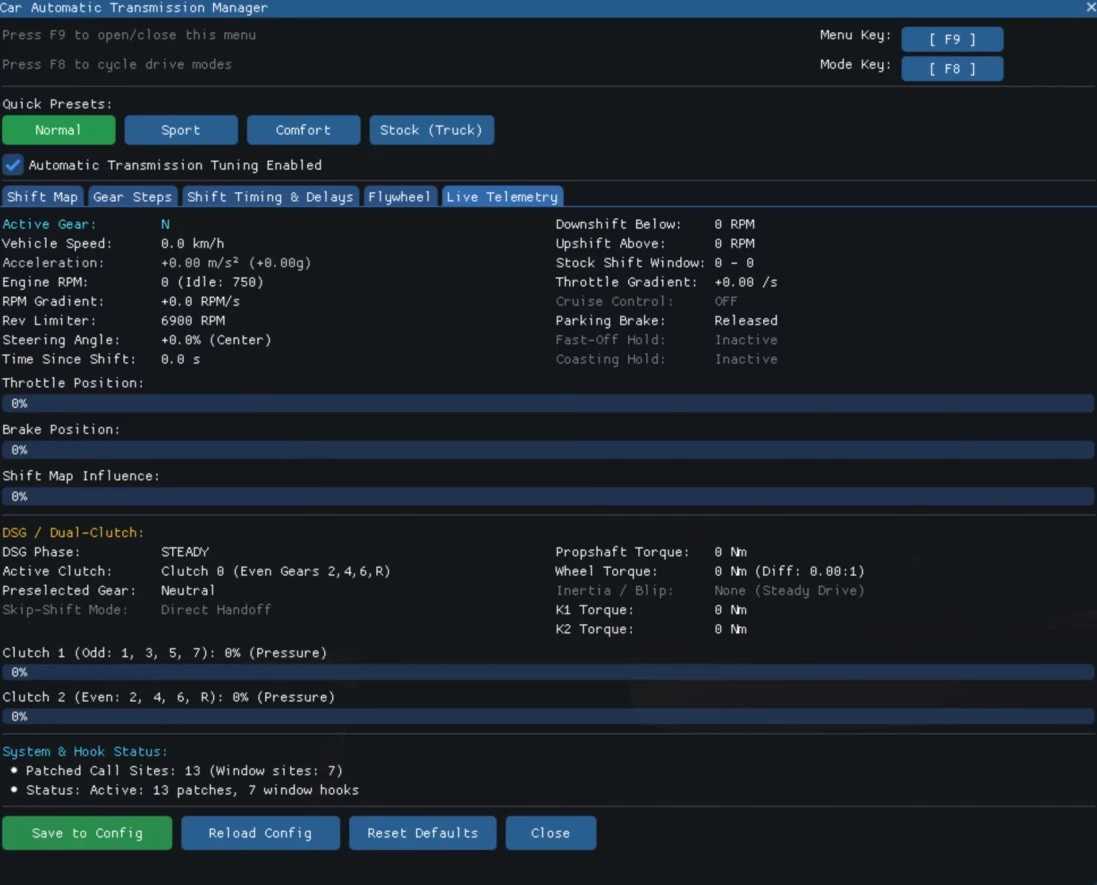
4 Selectable Drive Profiles: Switch seamlessly between Normal, Sport, Comfort via hotkey (default: F8) with HUD notifications
In-Game Menu: Open the in-game configuration window with F9 to customize transmission configurations
Live Telemetry Dashboard: Real-time diagnostics for active gears, G-forces, K1/K2 clutch pressure, propshaft torque, and active shift phases
Requirements
Developed and verified against Euro Truck Simulator 2 Version 1.61.1.0, Windows 64-bit. Tested with pedals and keyboard.
Install
Copy the “bin” folder from the archive into your ETS2 installation directory, so the DLL ends up here:
Euro Truck Simulator 2binwin_x64pluginscar_automatic_transmission.dll
Create the `plugins` folder if it does not exist. Start the game once and the folder `car_automatic_transmission` holding `car_automatic_transmission.cfg` appears next to the DLL:
Euro Truck Simulator 2binwin_x64pluginscar_automatic_transmissioncar_automatic_transmission.cfg
To uninstall, just delete the DLL and the `car_automatic_transmission` folder.
Multiplayer
Single player only. Do not use with TruckersMP or Convoy.
Credits: Deppelover
How to install ETS2 mods or ATS Mods
In Euro Truck Simulator 2 it’s easy to install mods. You just need to download mod from here, copy/unzip files into: “My Documents\Euro Truck Simulator 2\mod” folder or if you play ATS please install mods to: “My Documents\American Truck Simulator\mod” folder. To unzip files you can use: WinRAR or 7zip. After that you need to activate the mods you want to use.